



I ran across a couple of articles in my "to read" file that I thought might interest some of you. The articles are on social bookmarking tools (i.e. - del.isio.us) and expand on what was discussed at the September MDMLG General Business Meeting
Hammond T. Social Bookmarking Tools I D-Lib Magazine 11(4): 2005
http://dlib.org/dlib/april05/hammond/04hammond.html
Lund B. Social BOokmarking Tools II D-Lib Magazine 11(4): 2005
http://dlib.org/dlib/april05/lund/04lund.html
Read more!
Monday, September 25, 2006

Monday, September 18, 2006
The 2006 MDMLG Compensation Survey Report is now available on the members only section of the web site. Many thanks to all who participated.
http://www.mdmlg.org/members/salaries-benefits-survey.htm
Read more!
http://www.mdmlg.org/members/salaries-benefits-survey.htm
Read more!
Tuesday, September 12, 2006
At last week's meeting, we had an excellent panel of speakers who discussed the topic, "Stay Aware with Current Technology Pearls: Wikis, Blogs, RSS and Podcasting".
The speakers were:
--Gillian Mayman, Informationist, Public Health Library & Informatics, University of Michigan
--Patricia Anderson, Dentistry Library, University of Michigan
--Alexia Estabrook, Information Services Librarian, Providence Hospital
Due to popular demand, we have loaded their presentations on the MDMLG web site at
http://www.mdmlg.org/september-2006-program-links.htm.
Read more!
The speakers were:
--Gillian Mayman, Informationist, Public Health Library & Informatics, University of Michigan
--Patricia Anderson, Dentistry Library, University of Michigan
--Alexia Estabrook, Information Services Librarian, Providence Hospital
Due to popular demand, we have loaded their presentations on the MDMLG web site at
http://www.mdmlg.org/september-2006-program-links.htm.
Read more!
Saturday, September 09, 2006
So, now you have a blogger account. Now what? What do you read? Often times finding a blog or news source of interest is serindipitous. I plan to eliminate some of the legwork by posting entries about feeds to read. I'm going to start out with the entry in the LIS Wiki on Weblogs - Medical Librarianship, which contains a list of blogs written by by or are about medical librarians, libraries, or library associations. To subscribe to any of the blogs listed just click the Feed link and follow the directions posted in this blog entry.
Links:
LIS Wiki
Weblogs - Medical Librarianship
Related entry - setting up a Bloglines account
Read more!
Links:
LIS Wiki
Weblogs - Medical Librarianship
Related entry - setting up a Bloglines account
Read more!
Friday, September 08, 2006
As promised, here is my first blog article building on material presented in the September MDMLG program. I chose Bloglines because that is what I use. Other readers will probably function much the same way.
The first thing you need to do is sign up for a Bloglines account:
1. Go to http://www.bloglines.com.
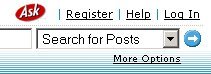
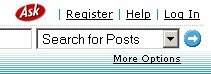
2. Click on the Register link, found at the upper right corner of the page.
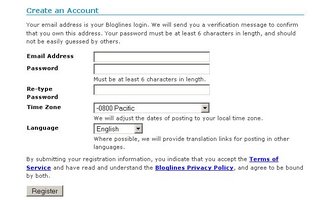
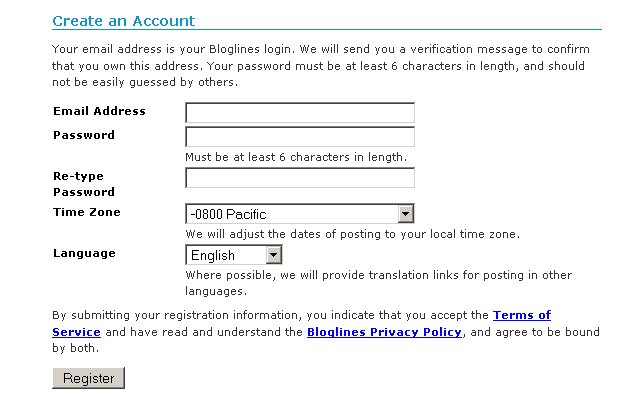
3. Fill in your email address, type a password, confirm the password, and choose your time zone. Click on the Register button to submit your information.
4. Reply to the confirmation email to complete the registration process.
Once you have a Bloglines account you can then add feeds. This is a relatively simple process. You may find it easiest to have two browser windows open, one with Bloglines loaded and the other to capture the urls for the feeds in which you wish to subscribe.
1. To find the url for the feed, find a blog you wish to follow and look for an orange RSS or XML button, or a link that says RSS, XML, or META.
2. Click on that link, highlight the address in the browser's address bar, and press ctrl+c keys to copy the address.
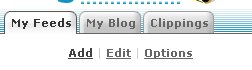
3. In the browser window that has Bloglines loaded, click the Add link, which can be found at the top of the left frame.
4. Make sure the cursor is in the Blog or URL Feed: field. Press ctrl+v to past the url into the field.
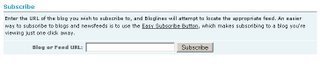
5. Click on the subscribe button.
6. Personalize your options (I will go into more detail about customizing Bloglines in a future blog entry).
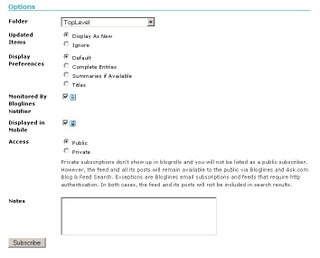
7. Click on the subscribe button to complete the subscription.
Now you are ready to read your RSS Feeds!
Read more!
The first thing you need to do is sign up for a Bloglines account:
1. Go to http://www.bloglines.com.
2. Click on the Register link, found at the upper right corner of the page.
3. Fill in your email address, type a password, confirm the password, and choose your time zone. Click on the Register button to submit your information.
4. Reply to the confirmation email to complete the registration process.
Once you have a Bloglines account you can then add feeds. This is a relatively simple process. You may find it easiest to have two browser windows open, one with Bloglines loaded and the other to capture the urls for the feeds in which you wish to subscribe.
1. To find the url for the feed, find a blog you wish to follow and look for an orange RSS or XML button, or a link that says RSS, XML, or META.
2. Click on that link, highlight the address in the browser's address bar, and press ctrl+c keys to copy the address.
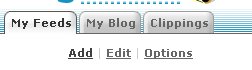
3. In the browser window that has Bloglines loaded, click the Add link, which can be found at the top of the left frame.
4. Make sure the cursor is in the Blog or URL Feed: field. Press ctrl+v to past the url into the field.
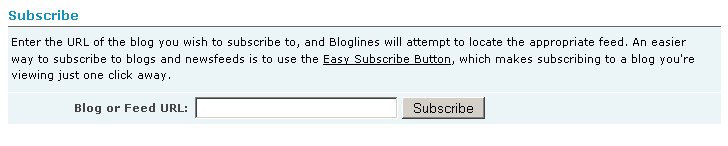
5. Click on the subscribe button.
6. Personalize your options (I will go into more detail about customizing Bloglines in a future blog entry).
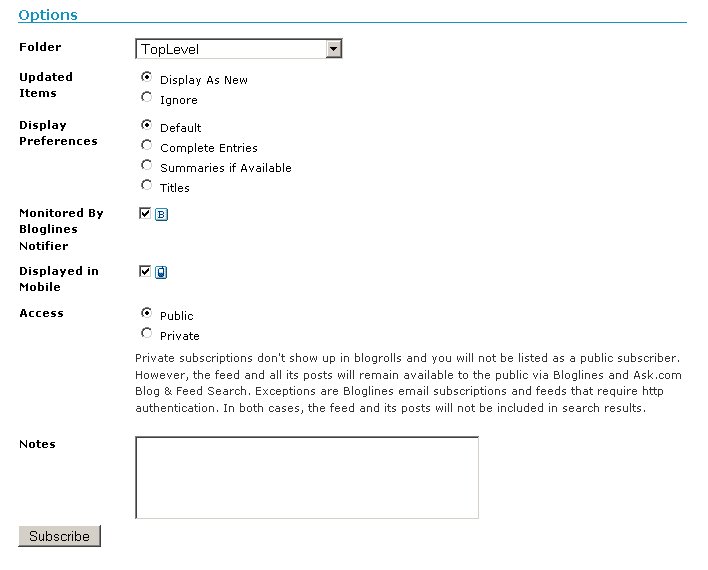
7. Click on the subscribe button to complete the subscription.
Now you are ready to read your RSS Feeds!
Read more!
I thought in light of the positive response from yesterday's program that I would build on that momentum by offering a series of step-by-step instructions based on some of the technologies presented. In addition, if you have any questions you would like to ask me or the other two presenters just post them in the comments section here and either I will answer them in a seperate post, or obtain answers from Patricia or Gillian and post them to the blog.
The first in the series will be a post on creating a Bloglines account and adding a feed to the account.
Read more!
The first in the series will be a post on creating a Bloglines account and adding a feed to the account.
Read more!